BonFX

Typography & Graphic Design Blog

  • Blog
  • Books
    • The Preposterously Huge Book of Google Font Combinations
    • The Big Book of Font Combinations (Classic Fonts Edition)
  • Gallery
    • Monster Alphabet
    • Pen and Ink Cartoons
    • The Algorithm FX
  • Services
  • About
  • Contact
You are here: Home / Totally Random / How to fix Firefox 3.6.x from crashing every 5 minutes

How to fix Firefox 3.6.x from crashing every 5 minutes

April 28, 2010 by Douglas Bonneville

Ever since upgrading to Firefox 3.6.x, it has been crashing seemingly at random. Firefox would just disappear in the middle me doing something. I nailed down one behavior that Firefox didn’t like and found a replacement solution that has worked 100% so far!

(UPDATE: Uninstall any Beta Flash plugins and install the current player (Mac). Zero crashes now)

It seems that two actions will cause Firefox, at some random point in time, to just disappear or hang for a few seconds and disappear, or just hang permanently. These two actions are:

  • Creating a new tab by either clicking in an empty space on the tab bar
  • Searching in the Firefox default search box in the top right of the browser

When I browse, I’m using shortcut keys or moving so fast that often I’m not sure exactly what the last action I did was the point of a crash. Firefox has been crashing so much, and I have found so little help, that I had to learn to slow down and see what it was I was doing that was causing the crashes.

The eureka moment

Yesterday, I browsed really slow all day. Normally this would drive me nuts, but it was an experiment. I finally nailed the crash culprit down to one specific action: when I click in the Firefox search box and hit the first letter…BOOM! No more Firefox. I tried it again. After a few tries, I realized it was simply typing that first letter that would just BOOM Firefox into the application black hole of non-existence.

Yes, I was really sick of the “Oops, we are so embarrassed” message. That message page was practically my surrogate starting page, I’ve seen it so much. I hadn’t thought about it, but the default search box is really the only way I search. I and really like the auto-suggest. What could I do? I needed to replace that search box with something else.

The Solution

I normally don’t like toolbars that get in the way, but I knew from prior usage that the Google Toolbar has a very diplomatic setting that basically hides the toolbar 100%, but at the same time, allows it to take over the default search box that Firefox provides. My guess was that if I replaced the default search box, at this point, I’d never see another crash caused by simply searching.

Four days later, not a single crash. Wow.

So, install Google Toolbar to stop crashing if you have similar crashes like I describe, and change the settings as follows:
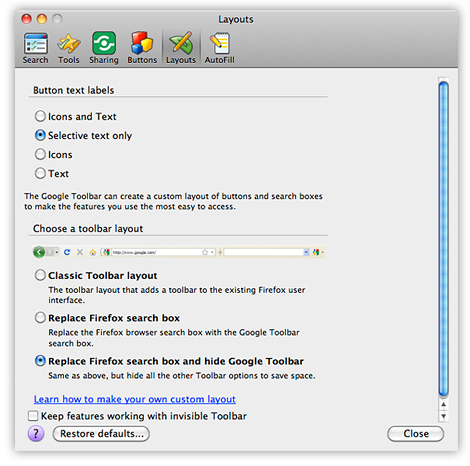
Good luck! And happy no-crash Firefox surfing!

About Douglas Bonneville

Douglas has been a graphic designer since 1992, in addition to software developer and author. He is a member of Smashing Magazine's "Panel of Experts" and has contributed to over 100 articles. He is the author of "The Big Book of Font Combinations", loves cats, and plays guitar.

Still Googling UX terms?

Stop. They're all right here.

UX for Cats book cover

50 terms. Illustrated.
So simple your cat gets it.

Get the Book →

Print & ePub on Amazon

350 font combinations you can steal.

The Big Book of Font Combinations

Every pairing shown in context — web, print, headings, body. Open it, find one that works, use it.

That's it. That's the book.

In print or ePub 40% OFF on Gumroad

Scrolling Google Fonts for "the right one"?

You've been at it for 20 minutes. You'll be at it for 20 more. There are 1,500 fonts in there.

Pocket Handbook of Google Fonts Combinations

We paired every useful Google Font.
7,500 pages. Done.

Get the PDF →

Instant download on Gumroad

Recent Inspirations

  • 50 Essential UX Terms Every Designer Must Know, Illustrated February 8, 2026
  • Why Ugly Websites Win: The Case for Brutal Minimalism in 2026 January 20, 2026
  • The Post-Design Web: Why System Fonts Are the Future January 20, 2026
  • What Fonts Go With Work Sans? January 11, 2026
  • What Fonts Go With Source Sans Pro? January 11, 2026
  • What Fonts Go With Rubik? January 11, 2026
  • What Fonts Go With Nunito Sans? January 11, 2026
  • What Fonts Go With Neuton? January 11, 2026
  • What Fonts Go With Josefin Sans? January 11, 2026
  • What Fonts Go With Inconsolata? January 11, 2026
  • What Fonts Go With Fira Sans? January 11, 2026
  • What Fonts Go With Chivo? January 11, 2026
  • What Fonts Go With Cardo? January 11, 2026
  • What Fonts Go With Roboto? January 11, 2026
  • What Fonts Go With Spectral? January 11, 2026

Copyright © 2026 · BonFX

  • Blog
  • Books
    • The Preposterously Huge Book of Google Font Combinations
    • The Big Book of Font Combinations (Classic Fonts Edition)
  • Gallery
    • Monster Alphabet
    • Pen and Ink Cartoons
    • The Algorithm FX
  • Services
  • About
  • Contact